
Running one coding agent at a time and babysitting it is the beginner move; running five and losing track of which terminal is doing what is the intermediate failure mode most people hit next. Orca, built by YC-backed Stably AI, calls itself an ADE — an Agent Development Environment — built specifically for that second stage: running a genuine fleet of coding agents in parallel, each isolated in its own git worktree, tracked from one place, with a mobile app to check in from your phone when you're away from the desk.
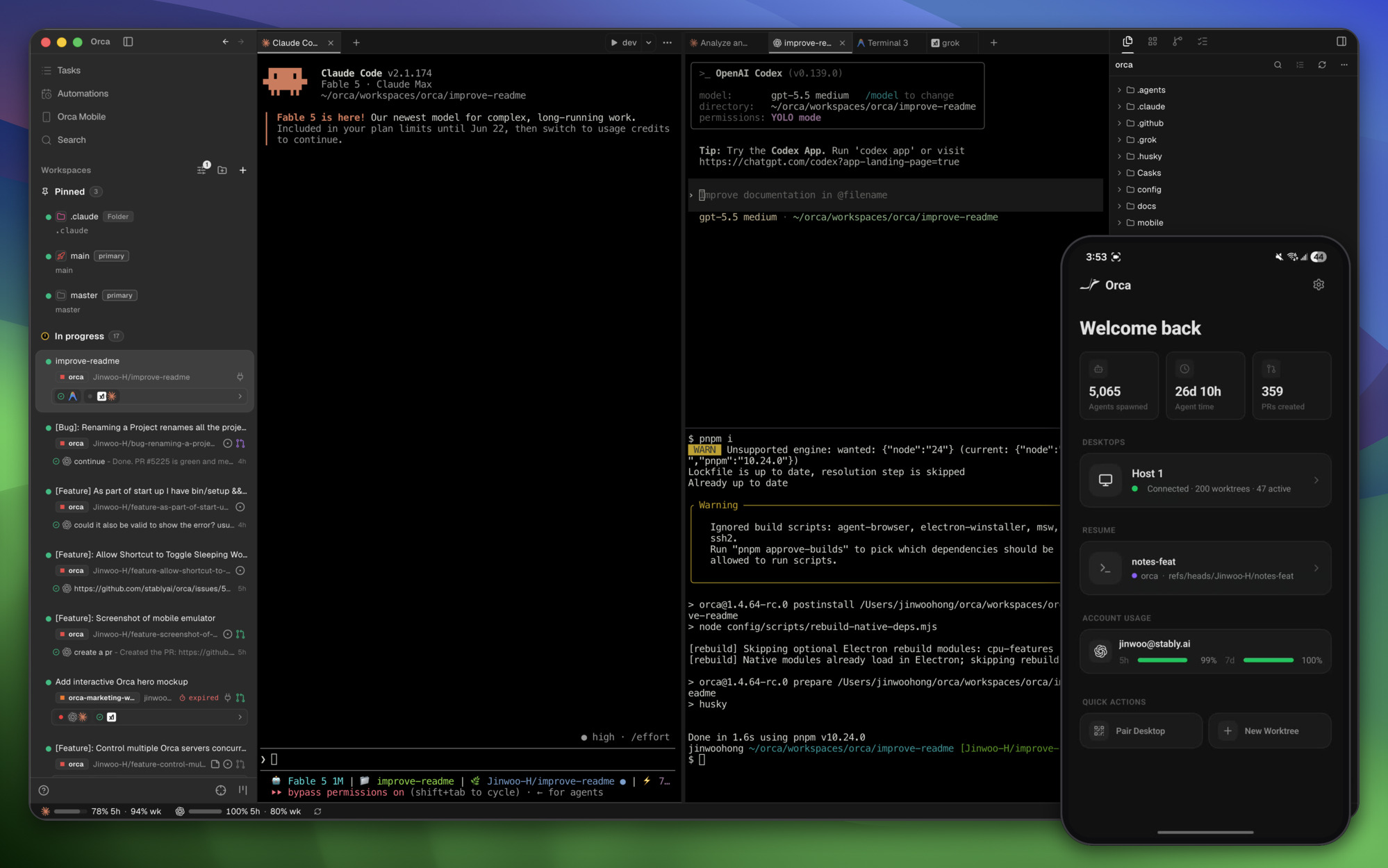
Parallel Worktrees Are the Core Idea
The headline feature is fanning one prompt across several agents at once, each running in its own isolated git worktree, so you can compare the results side by side and merge whichever attempt actually worked best. That's a genuinely different workflow than running agents sequentially and hoping the first attempt is good enough — it trades compute for a real A/B comparison on a task, which matters more the higher the stakes of getting an implementation right the first time. Git worktrees make this cheap to do without the mess of branch-juggling by hand, and Orca also supports SSH worktrees for running agents against a remote host rather than only local checkouts.
Almost Any CLI Agent, Not a Closed Ecosystem
Orca's stated design principle is blunt: if it runs in a terminal, it runs in Orca. The supported-agents list backs that up — Claude Code, Codex, Cursor, GitHub Copilot, OpenCode, Grok, Devin, Goose, and roughly twenty more CLI coding tools are explicitly listed, alongside a catch-all "+ any CLI agent." That's a meaningfully different bet than the growing crop of orchestration platforms that pick one or two favored agents and build tight integrations around just those — Orca is explicitly agent-agnostic, treating the orchestration layer as the product rather than any particular underlying model or tool.
Steering Agents From Your Phone
The mobile companion app (available on iOS App Store, TestFlight, and as a direct Android APK) is worth calling out specifically because most agent-orchestration tools stop at the desktop. It lets you monitor running agents, get notified when one finishes, and send follow-up instructions from your phone — a real answer to the actual failure mode of kicking off a long-running agent task and then being away from the machine when it needs a decision. Whether that matters depends entirely on how you work; for anyone running long, multi-hour agent tasks that need occasional human judgment calls mid-flight, it closes a real gap.
The Rest of the Feature Set
A few other pieces round out the environment:
| Feature | What it does |
|---|---|
| Terminal Splits | Ghostty-class terminals with WebGL rendering, infinite splits, and scrollback that survives restarts |
| GitHub & Linear, native | Direct integration rather than a bolted-on webhook, including stacked pull request support |
| Annotate AI Diffs | Leave inline comments directly on an agent's proposed diff before accepting it |
| Drag Files to Agents | Attach files to an agent's context by dragging them in, rather than describing paths in text |
| Orca CLI | Scriptable command-line access for automating agent orchestration outside the GUI |
| Design Mode | A visual mode for design-focused work, distinct from the terminal-first coding flow |
Design Mode and the Rest of the Review Workflow
Two features worth understanding on their own, not just as line items in the feature table. Design Mode lets you click any element in a real embedded Chromium window and have its HTML, CSS, and a cropped screenshot sent straight into an agent's prompt — a direct way to point an agent at "this specific button" rather than describing it in text and hoping the agent finds the right DOM node. Annotate AI Diffs works the other direction: instead of accepting or rejecting an agent's proposed diff wholesale, you drop inline comments directly on specific lines and ship them back to the agent for a revision, keeping the review loop inside Orca rather than switching to a separate PR review tool. Both are aimed at the same underlying problem — reducing the amount of context that has to travel through a text description before an agent can act on it.
Installation and Where It Runs
Orca ships as a desktop app for macOS, Windows, and Linux, downloadable directly from onorca.dev or through a package manager (Homebrew cask on macOS, an AUR package on Arch Linux), plus platform-specific builds — DMG, Windows installer, or Linux AppImage — available straight from GitHub releases. Beyond local desktop use, orca serve supports running on a headless Linux server, which combined with the SSH worktree support means the actual agent execution doesn't have to happen on the machine you're looking at the UI from — a real answer for anyone who wants agent compute on a beefier remote box while still reviewing and steering from a laptop. The mobile companion apps are separate installs (iOS via the App Store or TestFlight, Android via a direct APK) that pair with a running desktop instance rather than running agents independently on the phone itself.
How It Compares to Paperclip and jcode
Orca sits in the same general space as Paperclip and jcode — all three exist because running multiple AI coding agents at once creates a coordination problem plain terminal tabs don't solve — but they solve different slices of it. Paperclip is an org-chart-and-governance layer for long-running, budget-tracked autonomous agents. jcode is a single low-memory harness built to run many sessions efficiently with its own agent-memory system. Orca is closer to an IDE: parallel git worktrees, side-by-side comparison, and a genuinely broad any-CLI-agent compatibility list, with the mobile app as its most distinctive addition. Which one fits depends on whether the actual pain point is governance at scale, per-session resource cost, or comparing several attempts at the same task before committing to one.
Practical Implications
- The worktree-comparison workflow is the feature worth testing first. Fanning a genuinely ambiguous or high-stakes task across several agents and comparing outputs is a different (and often better) use of compute than accepting the first attempt — worth trying specifically on a task where you're not confident which approach is right.
- Broad agent compatibility reduces lock-in. Because it's agent-agnostic rather than betting on one model or CLI, adopting Orca doesn't mean standardizing your whole team on a single coding agent — a real advantage if different engineers already have different preferences.
- The mobile app is a genuine differentiator, not a gimmick, for long-running tasks — but it's also additional attack surface and a new place credentials and session state live, worth a normal security review before connecting it to anything sensitive.
- This is a fast-moving, actively developed product — release notes show two dozen PRs merged in a single release cycle covering features, fixes, and performance work, which is a good sign for momentum but also means the surface area is still shifting.
Practical Takeaway
Orca is a bet that the next real productivity gain in AI-assisted development isn't a better single agent, it's better infrastructure for running several agents at once and picking the best result — parallel worktrees, broad agent compatibility, and remote visibility via mobile are all pointed at that same idea. For teams already running multiple coding agents and feeling the coordination overhead, it's worth trying specifically for the parallel-comparison workflow before evaluating the rest of the feature set.
Teams building or adopting multi-agent development workflows — orchestration, comparison, or remote agent management — can get hands-on architecture help from Woyce Technologies.
FAQ
What is Orca?
Orca is an open-source Agent Development Environment (ADE) that runs multiple CLI coding agents — Claude Code, Codex, Cursor, and dozens of others — in parallel, each in its own isolated git worktree, with a desktop app for macOS, Windows, and Linux plus a mobile companion app for iOS and Android.
Is Orca free to use?
Yes, it's MIT-licensed and open source, available as a free download for desktop and mobile.
Which coding agents does Orca support?
Nearly any CLI-based coding agent, including Claude Code, Codex, Cursor, GitHub Copilot, OpenCode, Grok, Devin, Goose, and roughly twenty others explicitly listed, with the stated principle that any terminal-based agent can run inside it.
What are parallel worktrees in Orca?
A workflow where one prompt is sent to multiple agents at once, each working in its own isolated git worktree, so the results can be compared side by side before merging the best one — rather than accepting a single agent's first attempt.
Can I monitor Orca agents remotely?
Yes — a mobile companion app for iOS and Android lets you monitor running agents, get notified when one finishes, and send follow-up instructions from your phone.
How is Orca different from Paperclip or jcode?
All three address coordination problems that come from running multiple AI coding agents, but Orca focuses on an IDE-style experience with parallel worktree comparison and broad agent compatibility, Paperclip focuses on org-chart-style governance and budgets for autonomous agents, and jcode focuses on a low-memory harness with its own agent-memory system.
Can Orca run agents on a remote server instead of my local machine?
Yes — it supports SSH worktrees for running agents against a remote host, and orca serve explicitly supports headless Linux server deployment, so agent execution can live on a separate, more powerful machine while you review and steer from the desktop or mobile app.
What is Design Mode in Orca?
A visual feature that lets you click any element inside a real embedded Chromium browser window and have its HTML, CSS, and a cropped screenshot sent directly into an agent's prompt, so you can point at a specific UI element instead of describing it in text.
Does Orca integrate with GitHub and Linear directly?
Yes, natively rather than through a bolted-on webhook — you can browse pull requests, issues, and project boards inside Orca, open a worktree straight from a task, and the latest release added support for stacked pull requests specifically.
Is Orca actively maintained?
Very — the project describes itself as shipping daily, and a single recent release changelog listed two dozen merged pull requests spanning new features, bug fixes, and performance work, which is worth knowing both as a sign of momentum and as a reason to expect the feature surface to keep shifting.
Does Orca collect usage data?
Orca collects anonymous usage telemetry by default, with details on what's collected and how to opt out published in its telemetry documentation — worth reviewing before connecting it to anything sensitive, same as any tool with broad filesystem and credential access.