
Terminal-based coding agents are genuinely productive, but a terminal is a poor place to review a long tool-call history, compare Git diffs, or preview an image the agent generated. Pi Web is a local browser interface built specifically for the Pi coding agent, reading the exact same local configuration and session files Pi's CLI already writes — so it's a second window into the same agent state, not a separate tool you have to keep in sync.
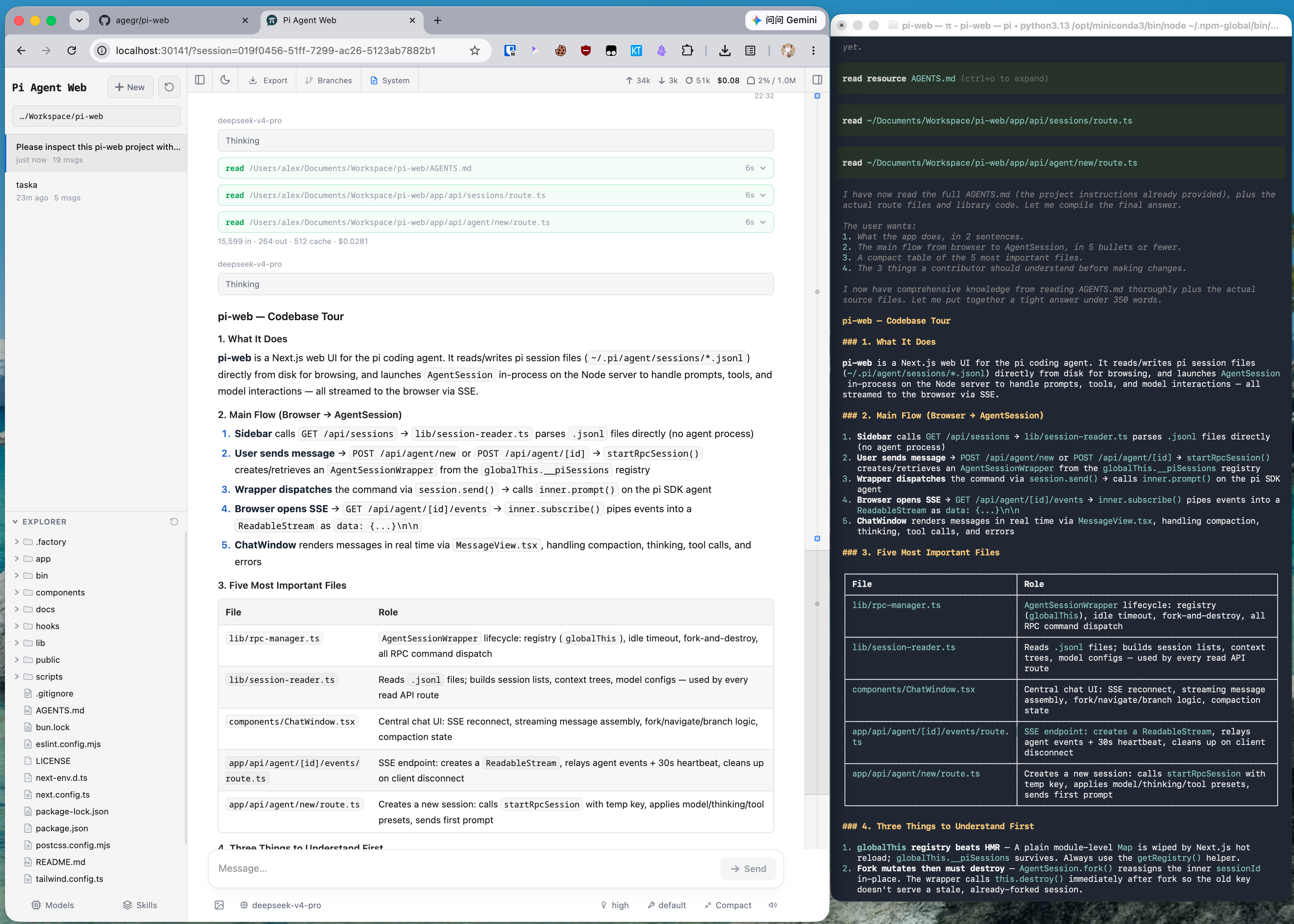
A Real Window Into Existing Sessions, Not a New Client
Because Pi Web shares Pi's local session files directly, conversations started in the terminal show up in the browser and vice versa — you can browse, resume, rename, export, and delete sessions grouped by project, with running state, context usage, cost, and compaction details visible at a glance. That shared-state design is the actual value proposition: this isn't a separate chat client that happens to talk to the same models, it's a genuinely alternate view onto the same underlying agent runtime and history.
Branching a Conversation Two Different Ways
A small but genuinely useful detail: Pi Web distinguishes between New session, which spins up an independent session file starting from an earlier message, and Edit from here, which creates a branch inside the current session. That's a real distinction worth having — sometimes you want to explore an alternate path without touching the original conversation at all, and sometimes you specifically want the branch to stay attached to where it came from. Most chat interfaces collapse this into one "edit and resend" behavior; keeping them separate gives more deliberate control over how session history actually gets structured.
Git Worktrees and Project File Tools, From the Browser
Beyond conversation management, Pi Web exposes the project-level tooling an agent session actually needs: browsing and uploading files, inspecting Git diffs, and previewing source code, Markdown, images, audio, PDFs, and DOCX files with automatic refresh as the agent works. A sidebar worktree switcher lets you change checkouts while keeping sessions from the same repository grouped together — useful for anyone running Pi against multiple branches or parallel work streams and wanting to review each in its own browser tab rather than juggling separate terminal windows.
It Handles Configuration, Not Just Viewing
Pi Web isn't limited to browsing sessions and files — the Models panel lets you sign in to a provider or add an API key, manage models, run model tests, install plugin packages, and manage skills without ever leaving the browser. Because that panel reads and writes through Pi's own model, settings, and credential storage, changes made in Pi Web are visible to the CLI immediately, and vice versa — there's no separate configuration surface to keep in sync. If no model provider is configured yet when you first open it, that's exactly where you're pointed to get started.
Getting Started
Pi Web requires Node.js 22.19.0 or newer. The fastest way to try it is npx @agegr/pi-web@latest, which starts the server and opens a browser automatically once it's ready — if it doesn't, the default address is http://127.0.0.1:30141. For a persistent install, npm install -g @agegr/pi-web@latest sets up the pi-web command globally; updating means stopping the process and rerunning the same install command, and uninstalling is a plain npm uninstall -g @agegr/pi-web.
Port and hostname are configurable via --port/-p or the PORT environment variable, and --hostname/-H or PI_WEB_HOSTNAME; --no-open (or PI_WEB_NO_OPEN=1) skips the automatic browser launch, which is useful when running it as a background service. Server-side model and API requests also honor the standard HTTP_PROXY, HTTPS_PROXY, and NO_PROXY environment variables, so it fits into an existing corporate-proxy setup without extra configuration. By default, Pi Web reads agent data from ~/.pi/agent, including session files stored under sessions/<encoded-cwd>/<timestamp>_<uuid>.jsonl; setting PI_CODING_AGENT_DIR points it at a different agent directory if you need to run against a non-default location.
Built on Next.js, With a Deliberate File-Access Boundary
Pi Web is a TypeScript project structured as a fairly conventional Next.js app: UI and API routes live in app/, React components in components/, client state and interaction hooks in hooks/, and the session, agent, model, file, Git, and security logic in lib/. The bin/ directory holds the npm CLI entrypoint and launch-option parsing that turns pi-web into a runnable command. That structure matters less for end users than one specific design choice buried in it: the file browser is explicitly scoped to working directories you've selected in Pi Web plus the project and session roots it already knows about — it's not a general filesystem browser, even though it's reading and writing through the same credential and session store the Pi CLI uses.
The interface itself follows the browser's language on first load and includes a language switcher, with English and Simplified Chinese both supported as first-class UI languages — a detail worth knowing if your team isn't English-only. For anyone embedding Pi Web inside a larger app, there's also a documented extension point: Electron wrappers and other downstream integrations can listen for a cancelable pi-web:session-row-contextmenu browser event to substitute their own session-row context menu without patching Pi Web's own SessionSidebar component directly — a narrow, deliberate hook rather than an open plugin system.
The Security Model Is Documented Honestly
This is worth reading directly before deciding how to run it. Pi Web listens only on 127.0.0.1 by default — loopback-only, not reachable from the network — and the project is explicit about what changes if you bind it elsewhere: binding to a non-loopback address exposes an agent that can execute high-privilege actions, and the documentation recommends a long random password via HTTP Basic Auth if you do that on a trusted LAN. Just as important, it states plainly that Basic Auth doesn't encrypt the password in transit, and explicitly warns against exposing Pi Web over plain HTTP to the internet — HTTPS through a trusted reverse proxy or a trusted VPN is the stated requirement for anything beyond a local machine or trusted LAN. That's a genuinely clear, non-hand-wavy security posture for a tool whose whole job is giving browser access to an agent that can run commands and touch files.
Practical Implications
- The default, loopback-only setup is the right choice for almost everyone — running Pi Web to get a browser UI on the same machine where Pi already runs, with no network exposure at all.
- Take the remote-access warnings literally, not as boilerplate. An agent reachable from a network that can execute high-privilege actions is a real target; if you do open it up beyond localhost, use the documented password-plus-HTTPS-proxy setup rather than binding it open on a LAN with defaults.
- The dual branching model is worth understanding before you rely on it — knowing whether you're creating an independent session or a branch inside the current one changes how your session history and cost tracking end up organized.
- This is a companion tool, not a replacement for the Pi CLI — it's genuinely useful as a second interface onto the same sessions, not something you'd choose over the terminal experience entirely.
Practical Takeaway
Pi Web is a well-scoped companion to Pi — sharing session state directly rather than reimplementing agent logic, adding the specific things a browser does better than a terminal (diff review, file preview, visual session management), and being unusually direct about the real security trade-offs of exposing it beyond localhost. For anyone already running Pi and wanting a visual layer on top of the same sessions, it's a low-risk addition as long as the default loopback binding stays the default.
Teams building or evaluating browser-based interfaces for coding agents, or thinking through the security model for exposing agent tooling beyond a single machine, can get hands-on help from Woyce Technologies.
FAQ
What is Pi Web?
Pi Web is an open-source, local browser interface for the Pi coding agent. It reads the same local configuration and session files as Pi's CLI, letting you browse, resume, and manage agent conversations, inspect project files, and switch Git worktrees from a browser.
Is Pi Web free to use?
Yes, it's MIT-licensed and open source, installable via npx @agegr/pi-web@latest or as a global npm package.
Does Pi Web replace the Pi command-line interface?
No — it's a companion tool that shares the same session files and configuration, giving a browser-based view onto the same agent state rather than replacing the CLI experience.
Is it safe to expose Pi Web to my network?
Only with real precautions. It binds to localhost only by default. Binding to a non-loopback address exposes an agent capable of high-privilege actions, and the project explicitly recommends a long random password plus HTTPS through a trusted reverse proxy or VPN — never plain HTTP over the open internet.
What's the difference between "New session" and "Edit from here" in Pi Web?
"New session" creates an independent session file starting from an earlier message. "Edit from here" creates a branch inside the current session instead, keeping it attached to the original conversation.
What file types can Pi Web preview?
Source code, Markdown, images, audio, PDF, and DOCX files, with automatic refresh as files change during an agent session.
How do I install and run Pi Web?
The fastest way is npx @agegr/pi-web@latest, which requires Node.js 22.19.0 or newer and opens a browser automatically once the server is ready. For a persistent command, install it globally with npm install -g @agegr/pi-web@latest and run pi-web.
Can I change the port or hostname Pi Web listens on?
Yes — --port/-p or the PORT environment variable sets the port, and --hostname/-H or PI_WEB_HOSTNAME sets the bind address. The default is 127.0.0.1:30141, loopback-only.
Does Pi Web support languages other than English?
Yes — the interface follows the browser's language on first load and includes a manual language switcher, with English and Simplified Chinese currently supported as first-class UI languages.
Can Pi Web be embedded or extended by other applications?
There's a narrow, documented extension point for this: Electron wrappers and other downstream integrations can listen for the cancelable pi-web:session-row-contextmenu browser event to supply their own session-row context menu without modifying Pi Web's source directly.