
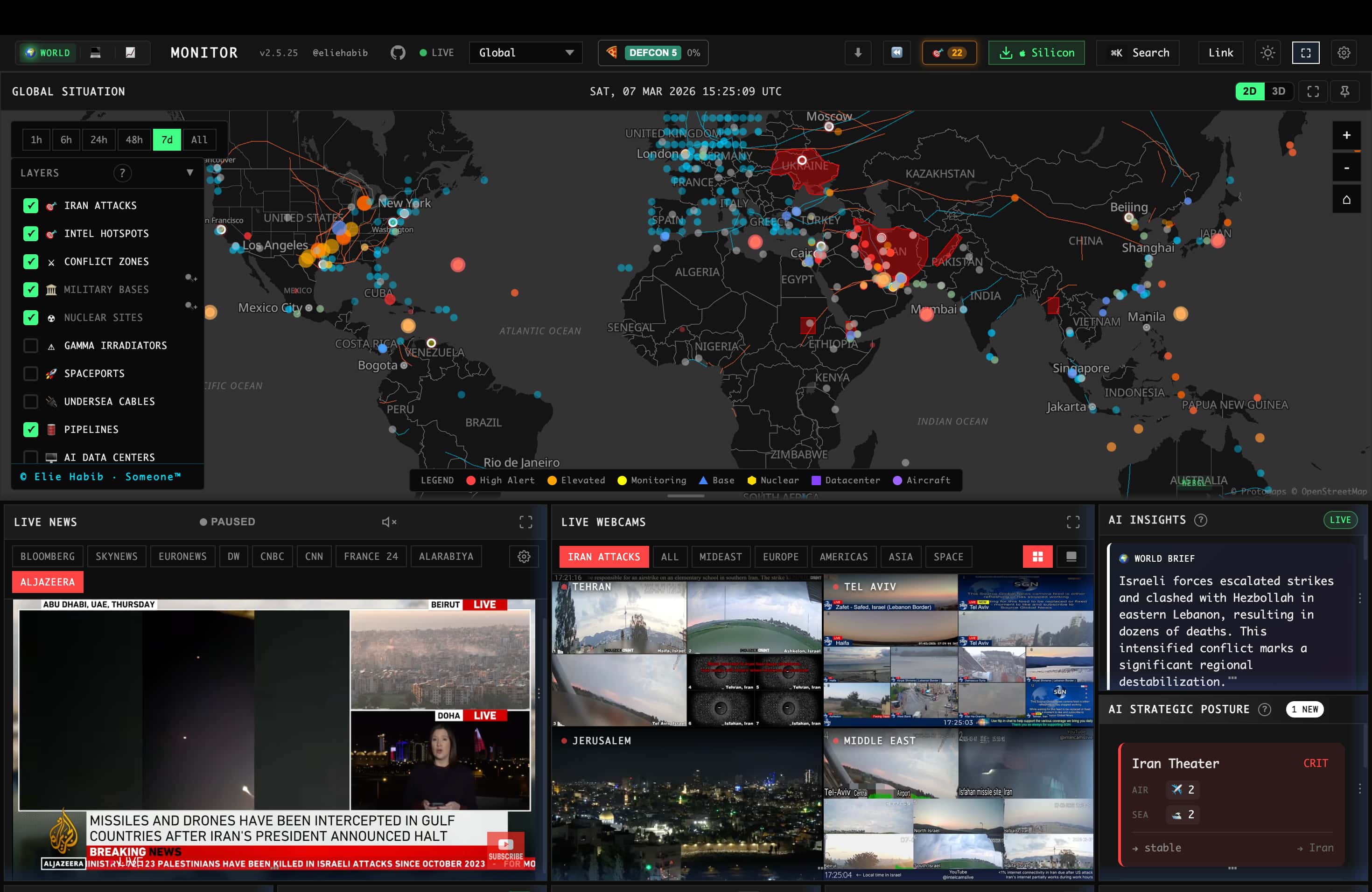
Palantir built a business around fusing disparate intelligence feeds into one situational picture for governments and enterprises willing to pay for it. World Monitor is an open-source attempt at a similar idea aimed at anyone with a browser: it pulls together news, flight data, shipping, market signals, conflict reporting, and infrastructure alerts into a single live map and dashboard, with AI doing the work of turning hundreds of raw feeds into something a person can actually scan.
What It Actually Aggregates
The scale of what's being pulled together is the headline feature: 500+ curated news feeds across 15 categories, synthesized by AI into readable briefs rather than left as a raw firehose. On top of the news layer sits a dual map engine — a 3D globe and a WebGL flat map — carrying 56 distinct layer types, from aviation delays and GPS jamming zones to military basing and live webcam feeds. A Country Instability Index scores 31 tier-one countries using a server-authoritative model that correlates military, economic, disaster, and escalation signals against each other, rather than surfacing each feed as an isolated, uncorrelated alert.
There's a finance layer running alongside the geopolitical one — 29 stock exchanges, commodities, and crypto tracked through a seven-signal composite — which is a deliberate design choice: geopolitical events and market movement are causally linked often enough that treating them as separate dashboards misses the connection a real analyst would draw between them.
Local AI Is a First-Class Option, Not an Afterthought
The detail worth highlighting for anyone evaluating this seriously: World Monitor explicitly supports running its AI classification and summarization entirely through Ollama, with no API keys required. For a tool whose whole purpose is processing sensitive geopolitical and financial monitoring data, having a fully local inference path — rather than every classification call round-tripping to a third-party API — is a real architectural commitment, not a checkbox feature. Groq and OpenRouter are supported as hosted alternatives for teams that want faster inference and don't mind sending traffic externally.
How It's Actually Built
This isn't a thin wrapper around an RSS reader. The tech stack backing it is a full, deliberately engineered system: a Vanilla TypeScript and Vite frontend rendering the globe through Three.js and the flat map through deck.gl and MapLibre GL, a Tauri 2 (Rust) desktop shell wrapping a Node.js sidecar for native macOS/Windows/Linux builds, and an API layer described by nearly 300 Protocol Buffer definitions across three dozen services. Beyond the Ollama/Groq/OpenRouter classification path, browser-side inference runs through Transformers.js directly in the client for tasks that don't need a full model round-trip. Caching runs through Redis with a three-tier strategy backed by CDN and service-worker layers — necessary infrastructure once you're aggregating from hundreds of upstream sources without hammering any of them or serving stale data during a fast-moving event. Flight data specifically comes from Wingbits, an ADS-B data provider credited directly in the README rather than left unattributed.
Six separate site variants — general world monitoring, tech, finance, commodities, and two others — ship from the same codebase and the same desktop binary, switchable in-app rather than requiring separate installs. That's a meaningfully different maintenance model than running six forks, and it shows in how tightly scoped the release notes are to shared infrastructure fixes (caching, rate limiting, feed reliability) rather than variant-specific rewrites. The project also publishes a support-status table distinguishing what's actively maintained from what isn't: all six web variants and every desktop binary (Windows, macOS Apple Silicon, macOS Intel, Linux AppImage) are marked stable, built from the same release process, and triaged from a single shared issues backlog rather than per-variant queues.
Underneath the 500+ curated feeds sits a broader collection layer — the project describes tracking 531+ observed upstream hosts across geopolitics, finance, energy, climate, aviation, cyber, military, and infrastructure sources, monitored for freshness across 35 distinct source groups so a stale or dead feed gets flagged rather than silently going quiet. Coverage extends to 26 languages with native-language feeds and right-to-left text support, which matters for a tool whose whole premise is surfacing signal from regions where the primary sources aren't in English.
Built for Agents, Not Just Browsers
World Monitor exposes itself the way a modern developer tool is expected to: an MCP server for direct agent access, a REST API described by an OpenAPI spec, an official CLI (npx worldmonitor), and zero-dependency SDKs in Python, Ruby, and Go. It also publishes an llms.txt and an agent-skills manifest — machine-readable discovery files aimed specifically at AI agents that need to figure out what a service offers without a human reading the docs first. That's a genuinely forward-looking piece of infrastructure design: treating "an AI agent might be the client, not a person" as a first-class case rather than an afterthought bolted onto a human-facing product.
Security Disclosures Are Handled in the Open
For a tool whose desktop app bridges a Rust shell, a Node.js sidecar, and remote data relays, the trust boundary between those pieces is a real attack surface, and World Monitor's README addresses it directly rather than staying silent on it. The project credits a specific researcher, Cody Richard, with responsibly disclosing three distinct findings in 2026: IPC command exposure, a trust-boundary analysis of the renderer-to-sidecar interface, and a credential-injection issue in the app's fetch-patching architecture. Naming the specific researcher and the specific categories of finding, rather than a vague "we take security seriously" line, is a stronger signal than most self-hosted dashboards bother to provide — it means there's an actual disclosure process behind the security policy rather than one that's never been exercised.
Licensing Has More Nuance Than "Open Source"
The AGPL-3.0 license covers personal use, self-hosting, forking, and even commercial use or SaaS deployment — as long as you comply with AGPL's copyleft and source-availability obligations when you do. Where it gets more restrictive is private-source proprietary use or use of the project's official branding, both of which require a separate commercial or trademark permission the AGPL alone doesn't grant. A commercial license is available as an explicit alternative for teams that need non-AGPL terms, which is the practical escape hatch for anyone who wants to build a closed-source product on top of World Monitor rather than release their modifications.
Practical Implications
- For research, journalism, or analyst workflows, the value is in the correlation layer — the Country Instability Index and cross-stream signal convergence do work that would otherwise mean manually cross-referencing a dozen separate feeds and dashboards.
- The local-AI path is the right default for anything sensitive. Running classification through Ollama keeps the content you're monitoring off third-party infrastructure entirely — worth using deliberately rather than defaulting to a hosted inference provider out of convenience.
- Self-hosting is straightforward and well-documented — a plain
git cloneandnpm installgets a working local instance with no environment variables required for the base app, with a documented path to Vercel, Docker, or static deployment for anything beyond local use. - This is under an AGPL v3 license, which matters if you're planning to build on top of it and redistribute a modified version — read the copyleft terms before assuming MIT-style permissiveness for anything beyond running it as-is.
Practical Takeaway
World Monitor is a serious attempt at open-sourcing the "fuse everything into one situational picture" category that's normally the domain of expensive enterprise intelligence platforms — real map engineering, a genuine correlation/scoring layer, a local-inference option, and agent-native access via MCP and published SDKs, not just a news aggregator with a map skin on it. For anyone doing OSINT, market-adjacent risk monitoring, or building an agent that needs live world-event context, it's worth trying the hosted variants first and evaluating self-hosting once the specific data sources and correlation logic prove useful for your actual workflow.
Teams building monitoring dashboards, real-time data architectures, or agent-accessible intelligence tooling can get hands-on help from Woyce Technologies.
FAQ
What is World Monitor?
World Monitor is an open-source, real-time situational-awareness dashboard that aggregates news, flight, shipping, market, and infrastructure data from 500+ sources into a live map and briefing interface, using AI to classify and summarize what it collects.
Can World Monitor run without sending data to a third-party AI provider?
Yes — it supports running its AI classification and summarization entirely through a local Ollama instance, with no API keys required, as an alternative to hosted providers like Groq or OpenRouter.
Is World Monitor free and self-hostable?
Yes, it's open source under AGPL v3. It can be self-hosted with a straightforward git clone and npm install, and the base app runs with no required environment variables — additional data sources may need their own API credentials.
Does World Monitor support AI agents directly?
Yes — it exposes an MCP server, a REST API with an OpenAPI spec, an official CLI, and SDKs in Python, Ruby, and Go, plus machine-readable discovery files (llms.txt, an agent-skills manifest) aimed specifically at AI agent clients.
What is the Country Instability Index?
It's a server-authoritative scoring model covering 31 tier-one countries that correlates military, economic, disaster, and escalation signals into a single stress score, rather than surfacing each data feed as an isolated alert.
Is World Monitor only a desktop app or also available as a website?
Both — it ships as hosted web variants (world, tech, finance, commodity, and others) and as a native desktop app for macOS, Windows, and Linux built with Tauri, all from a single shared codebase.
How many languages does World Monitor support?
26 languages, with native-language feeds and right-to-left text support rather than only translated UI strings over English-language sources.
Has World Monitor had any independent security review?
The README credits a named researcher, Cody Richard, with responsibly disclosing three security findings in 2026 covering IPC command exposure, renderer-to-sidecar trust boundaries, and a fetch-patch credential-injection issue — all handled through the project's published security policy.
Can I use World Monitor's code in a closed-source commercial product?
Not under the default AGPL-3.0 license, which requires sharing source for modifications and covers commercial/SaaS use only under its copyleft terms. A separate commercial license is available for teams that need non-AGPL terms, including private-source proprietary use.
Does World Monitor run any AI inference in the browser itself?
Yes — alongside the Ollama/Groq/OpenRouter path for classification and summarization, it uses Transformers.js to run some inference client-side rather than round-tripping every task to a model provider.